
Home/Blog/Anti-Patterns in Revenue Cloud: The Product Classification Trap
Revenue Cloud
Anti-Patterns in Revenue Cloud: The Product Classification Trap
Forceweaver Team · May 11, 2026 · 3 min read
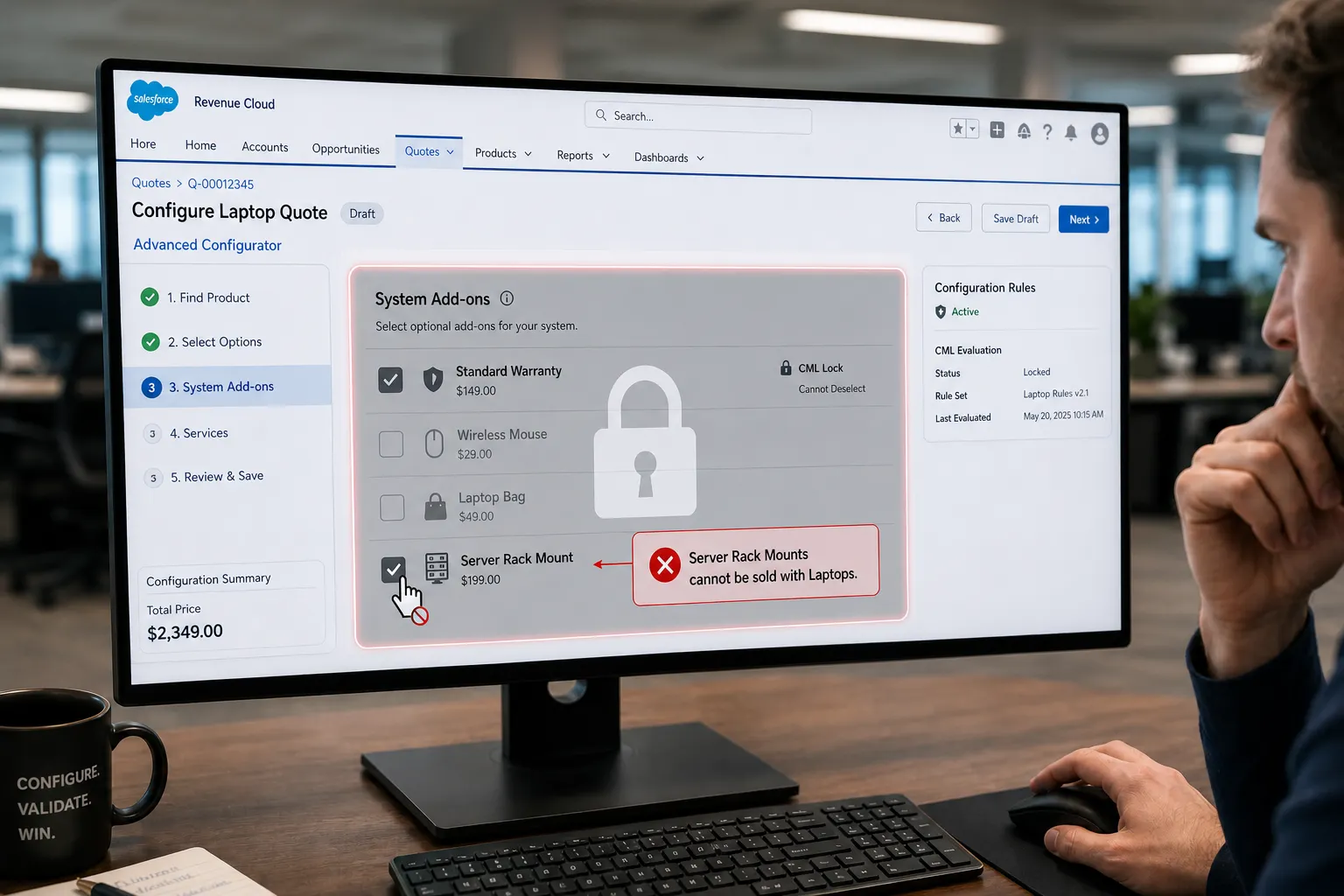
In the Salesforce Revenue Cloud Advanced Configurator, there is a specific situation that can bring a configuration to a standstill. It occurs when a user triggers an error they cannot fix because the UI has disabled the necessary controls.
As technical architects, we often treat Product Classifications as a way to group the products. Most of us overlook to the fact that those classifications also define the boundaries of your Constraint Modeling Language (CML) rules. If you are not careful with catalog architecture, you can create a shared classification trap: a deadlock where validation fails and the user cannot correct their selection.
The mechanics of the trap
This situation appears when an unintended product is effectively locked because it shares a Product Classification with another product that has a CML exclude (disable) rule applied.
If a user selects an incompatible product in that group and triggers a validation error, a shared exclude rule can gray out the entire section. The user cannot save because of the error, and they cannot remove the problematic product because the checkbox is disabled.
Why CML does this (the API perspective)
To understand this behavior, look at how the CML engine talks to the UI. In the API response, every product within a given classification shares the same Product Classification ID (prcId).
When a CML exclude rule fires for one product, the engine can apply a UI treatment that targets the entire shared component:
{
  "details": {
    "prcId": "0dSVc0000001u8uMAA",
    "stiId": "0QLVc0000044boLOAQ"
  },
  "uiTreatmentScope": "bundle",
  "uiTreatmentTarget": "component",
  "uiTreatmentType": "disable"
}
Because uiTreatmentTarget is the shared component (the classification group), the engine will lock the checkbox for every product in that group—not only the product you meant to constrain.
Example: the laptop quote
Imagine configuring a custom laptop. Your catalog has a classification called System Add-ons containing:
- Standard warranty — auto-added by the system
- Wireless mouse — optional
- Laptop bag — optional
- Server rack mount — incompatible with laptops; selecting it triggers an error
What goes wrong
- The system adds the standard warranty.
- To stop users from removing it, CML applies an exclude rule on the warranty.
- The API locks the entire System Add-ons classification component.
- A user unintentionally adds Server rack mount.
- The configurator shows an error such as: Server rack mounts cannot be sold with laptops.
- Because the whole System Add-ons section is grayed out by the warranty rule, the user cannot uncheck the rack mount. They are deadlocked and often must abandon the quote.
The fix: Architectural boundaries
This pattern shows why grouping products into classifications is a catalog design decision, not only a visual or attribute-grouping choice.
Product Classifications define the scope of CML rules when those rules target components. To avoid these lockouts:
- Isolate system-enforced lines — products that must stay selected or locked (for example, a bundled warranty) should live in their own classification, separate from user-selectable accessories.
- Do not mix locked and optional products in one classification — that combination is where shared
prcIdscope anddisabletreatments hurt recoverability.
Keeping locked catalog behavior in its own classification ensures system-driven constraints do not prevent users from fixing their own mistakes elsewhere in the configuration.